
Monday, November 28, 2016
360-Degree Classrooms

Monday, November 14, 2016
Parents View Grades Online

Since switching to the OnCampus student information system at the beginning of the 2016-2017 school year, the Academic Office is no longer emailing report cards to parents. Instead, parents can look at their student's progress through a secure password-protected online account and view grades as a PDF. Under the Performance tab, parents are also able to view monitor letters and advisee reports. The switch was a collaborative effort between the Academic Office and the Technology Office.
Friday, November 11, 2016
Taking Attendance by Phone App

This year saw a launch of the OnCampus system for taking attendance in class. For the first time, faculty have the ability to save the mobile site to their smart phone home screens and take attendance directly from their smart phones. This makes it easier to submit student attendance during the day for classes and other student commitments, such as athletics and activities.
Monday, October 31, 2016
Collaborative Technology Project for Day of Giving

Custom videos and the love of the Blair community come together in an innovative technology project to enhance Blair’s Inaugural Day of Giving this past April. With the guidance of fine arts faculty member Ms. Schiller, Shane Lusby '18 was able to collaborate on the project with Ms. Marsh, Director of Annual Giving. Shane used his DJI Phantom 3 Aerial Photography Drone to capture campus views. He also compiled footage of students and editing in Final Cut Pro for a sleek and professional look.
Monday, October 24, 2016
Google Docs, NPR, and the Presidential Debate

Mr. Fortunato has been meeting with students for a weekly seminar focused on the current presidential election, a process which has included live video conferencing with guest speakers. Technology is playing an increasing role in real world events. Most recently, the collaborative features of Google Docs have been used during the Presidential Debate between Hillary Clinton and Donald Trump. NPR provided a live fact-check over a real-time transcript of the debate. Using a closed-captioning service feeding into a Google Doc, more than 50 people comprised of reporters, editors, researchers, and copy editors had access to quickly write, review, and publish annotations while the transcript was appearing on a website. There was only a one- to two-minute delay between what was said in the debate and what appeared on the site. Google Docs collaboration is making a difference not only on our campus but beyond.
Here's a link to the NPR page: Fact Check Presidential Debate
Click here to read more information on the technical aspects of the NPR's page.
Monday, January 25, 2016
3D Printing in Two Colors


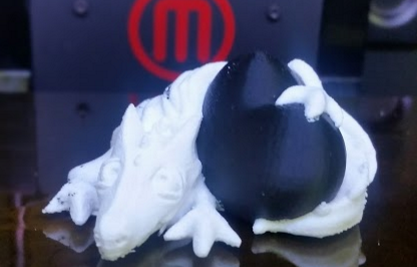
The first dual-extruded 3D project was printed eariler this year using one of Blair's Makerbot 3D printers. Each component is planned and built together, with the machine switching from one color to another. Layers are built using both colors in strategic positions so the final object has sections in two colors. The printed object in this photograph is a white dragon wrapped around a black egg.
Showing Videos without the ads

Looking for a way to show YouTube videos in a class assignment or presentation without the advertisements? Video content is being shown in classrooms more than ever here at Blair. YouTube is popular, but what about those ads and video content 'suggestions'? There is a free service anyone can use to stream ad-free video content from YouTube. It can be found at http://safeshare.tv. Simply enter the YouTube URL and get a "safe" link to just the content video, nothing else.
Subscribe to:
Posts (Atom)